LINUX DESKTOP PRODUCTIVITY
Floating Clipboard Manager & Always-on-Top Notes for Linux (Ubuntu, Debian, Fedora)
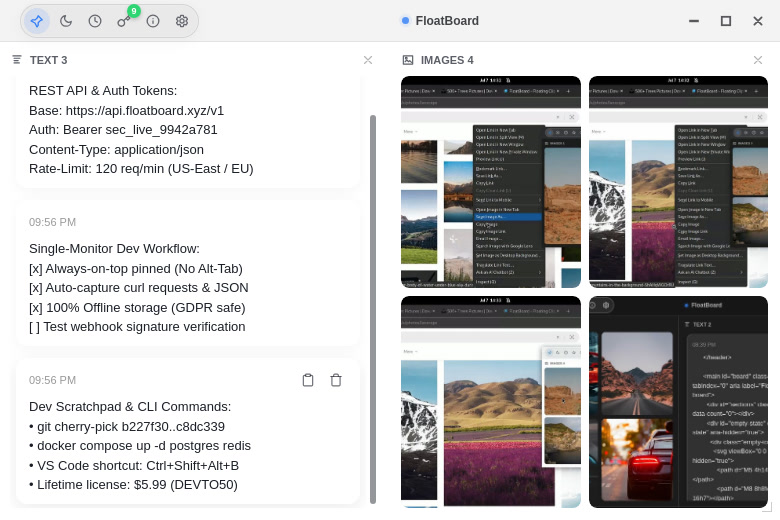
Wayland & X11 Compatibility
Designed for modern GNOME, KDE Plasma, XFCE, and i3/sway compositors
Terminal One-Liner Overlay
Pin frequent Docker commands, SSH aliases, and regex notes above your bash prompt
Why Linux Developers & Sysadmins Use FloatBoard
Managing servers, writing shell scripts, and developing software on Linux requires constant copying and cross-referencing. FloatBoard simplifies your workflow:
- Always-on-Top Command Pad: Keep frequent SSH commands, Docker one-liners, and regex patterns pinned above your terminal.
- Visual Reference Tiles: Pin UI mockups, terminal logs, or system architecture diagrams beside your code editor.
- Zero Cloud Dependency: All data is stored locally in offline storage with zero external calls or telemetries.
Easy Installation on Any Linux Distribution
FloatBoard provides native packaging for all major Linux distributions:
Snap Store (Universal)
Install directly from Canonical's Snap Store with sandboxed security and automatic updates:
sudo snap install floatboard
Debian & Ubuntu (.deb)
Native 64-bit Debian package for Ubuntu, Debian, Pop!_OS, and Linux Mint.
Download .deb package →Fedora & RHEL (.rpm)
Native RPM installer for Fedora, Red Hat Enterprise Linux, and openSUSE.
Download .rpm package →Portable AppImage
Zero-dependency standalone binary that runs on virtually any modern Linux distribution.
Download AppImage →Arch Linux & Manjaro (AUR)
Install via the Arch User Repository with automatic binary tracking:
yay -S floatboard-bin
Flathub (Flatpak)
Sandboxed universal Linux distribution available on any Flatpak-enabled desktop:
flatpak install flathub xyz.floatboard.FloatBoard