Developer workflow
Keep code snippets and screenshots together while debugging
A UI bug often sends you between an editor, a browser and a screenshot. A temporary board can keep the few details you are comparing in view. The useful unit is one debugging question: one visual symptom, one relevant snippet and one statement of what should happen.
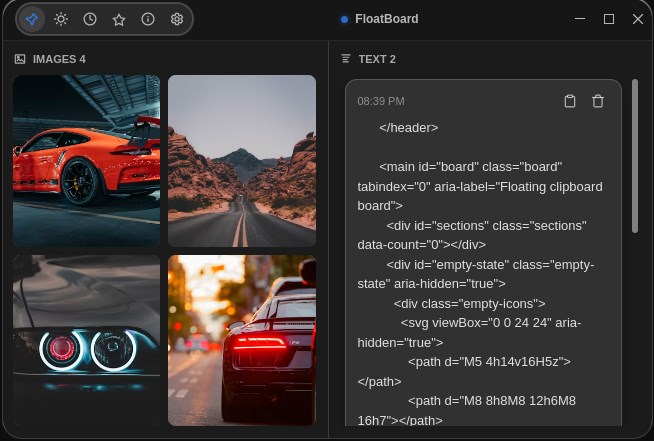
Capture the context that a copied snippet loses
A fragment such as an opening HTML tag tells you little when separated from its file. Alongside a snippet, record the file path, the component name and what you were checking. If the code comes from documentation, keep the documentation URL and the library version relevant to your project.
For a screenshot, note the viewport size, the action that produced the problem and the expected result. A screenshot of a clipped button is more actionable when the accompanying note says it happens after opening the menu at a narrow viewport.
Keep private credentials, access tokens and customer information out of a reference board. Copy only the minimum code and visual context needed to investigate the issue.
Set up a board for one layout bug
- Reproduce the symptom. Use your normal browser or app testing workflow and capture the affected area. Keep the original screenshot in the project’s issue or working folder.
- Find the smallest relevant snippet. Copy the markup or styling you need to compare. Include enough surrounding context to identify it, but avoid copying an entire file.
- Add the references to FloatBoard. Use the text and image panels to keep the snippet and screenshot available together. The supplied screenshot demonstrates this side-by-side layout.
- Write an expected result. For example: ‘The image grid should stay within the panel at 390 pixels wide.’ Put this beside your working notes rather than relying on memory.
- Pin the board and return to your editor. Position it where it does not cover the lines you are changing. Use it for reference while the editor and browser remain the tools that modify and test the code.
Example: a reference note for a clipped image grid
Suppose image cards extend beyond their container. Instead of collecting unrelated examples, make a short note with the following structure:
Question: Why does the image grid overflow?
File: styles/gallery.css
Reproduce: open gallery at a 390px viewport
Expected: cards fit without horizontal scrolling
Reference: screenshot of the overflowing panel
Next check: grid columns, item min-width, image sizing
This is an illustrative debugging checklist, not a diagnosis of FloatBoard. Its purpose is to keep the question and evidence together. Inspect the actual elements in your browser, change one relevant constraint, then repeat the same reproduction steps. Update the note with what changed rather than adding a second unexplained snippet.
A reference board does not run code, validate HTML or replace developer tools. The result is only confirmed when your application behaves correctly in the relevant test environment.
Use clipboard history for retrieval, the board for comparison
Clipboard history is useful when you need to retrieve something you copied earlier. A visible reference board solves a different problem: keeping selected material in sight while you work. Do not assume that a clipboard manager automatically gives a copied fragment the context of a documented snippet.
When you retrieve an older clip, compare it with the current source file before reusing it. A copied snippet is a snapshot; later changes in the repository do not automatically update that text. For the broader product workflow, read the clipboard manager guide.
Finish with a reproducible record
Once the issue is fixed, put the reproduction steps, final change and relevant screenshot in the project’s normal record, such as an issue or commit description. Keep long-lived snippets in a repository or documentation tool where they can be reviewed and maintained.
Then clear out references that no longer support the task. Avoid turning the board into an unlabelled backlog of old errors. If you need to compare many files, use the editor’s split view; if you need a shared review, use your team’s review tools.
Get FloatBoard for your operating system to try this with a small task. Check the free-plan limits first, and choose only the text and images needed to answer your current debugging question.